Factories & Manufacturers
How to Use AI to Find Potential Customers Around the Clock
To use AI to find potential customers, give it a buyer brief, send it to several sources, and make it show why each company belongs on the list. Then give it a way to act on what comes back. If the first search mostly finds competitors, the next search should go after the firms that buy or install the equipment.
How to use AI to find potential customers for your product
Say you make stainless-steel pumps for food processing. Searching for “food manufacturers in Europe” turns up thousands of businesses. A narrower brief gives the AI something it can check on a website.
Find companies in the UK and the Netherlands that build cleaning-in-place systems or distribute hygienic pumps. Save a product, project, or catalogue page that shows what each company builds or carries. Flag competing pump brands and companies whose role is unclear.
Start with a small batch. Open ten of the source links and check whether a colleague could explain each match from the page alone. If the list is full of dairies, add terms such as “CIP skid builder” and “process systems integrator.” If an exhibitor profile gives you a name and a booth number, look for the company’s own product pages before classifying it.
That cycle of searching, checking, and changing the next search is the idea behind T0. It’s the first stage of HUNT, our AI prospecting tool for manufacturers. Its job is to find companies worth researching and leave a trail a salesperson can follow.
How AI finds potential customers across four sources
T0 has one AI supervisor and four workers. The supervisor reads your buyer brief, decides what to investigate, and reviews what comes back. The workers do the collection. They run searches, open public pages, and extract company names, websites, and evidence of a possible fit. The supervisor can reassign work as it learns which sources are producing useful results.
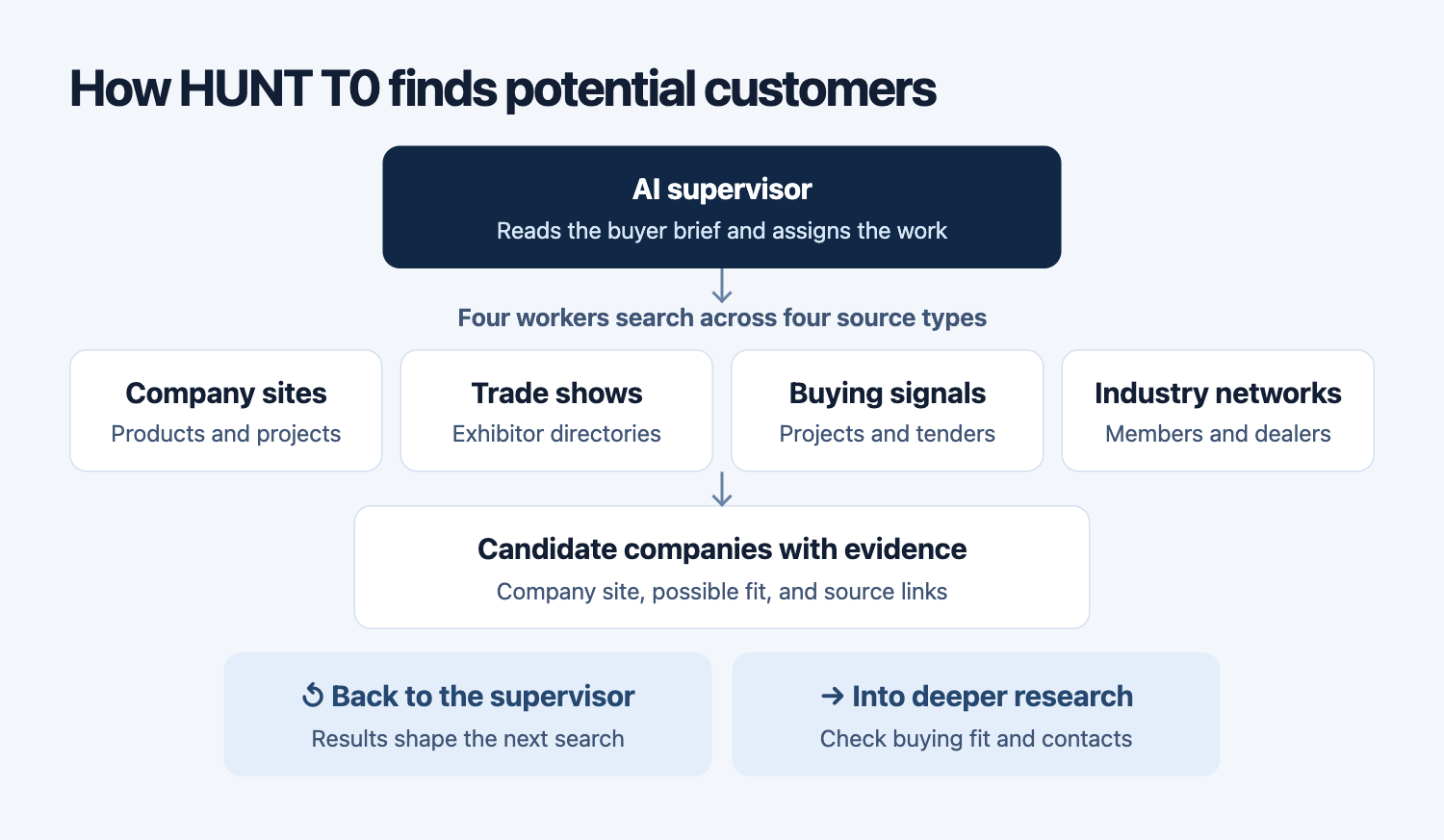
- Company websites. Search by what the buyer builds, installs, or resells. A project page showing a cleaning skid can be more informative than a homepage that just says “process equipment.”
- Trade show directories. Read exhibitor descriptions and follow them to company websites. An exhibitor selling bottling lines may buy hygienic pumps for its machines. A pump brand at the same show may compete with you.
- Buying signals. Check public project announcements and tenders for a named company, a date, and a reason the project might need your product. A factory expansion by itself tells you little about who will source the components. One place to look for official notices is the EU’s public procurement portal.
- Industry associations and dealer networks. Use member directories and dealer locators to find regional firms that broad searches miss. A dealer’s own catalogue can show whether it carries the right kind of equipment.
How AI keeps finding potential customers around the clock
Imagine a worker opens a trade show directory that displays hundreds of exhibitors. The first pass returns only the first page. T0 can inspect how the public directory loads more entries, test a different way of reading it on a few pages, and check that the next batch contains new companies. If the directory gives only exhibitor names, the worker can follow the detail pages or look up the official sites separately. It can save a usable first batch while it fills in the gaps.
There’s a second kind of error that matters more to sales. The worker may collect the right rows from the wrong source. If a search for hygienic pumps produces mainly pump manufacturers, the supervisor can change the next assignment to companies that build cleaning systems. If two sources list the same company, T0 can merge the records where the identity checks support it. If a source keeps repeating the same names or stops yielding usable pages, the supervisor can shift effort to another one.
The feedback comes from the work itself: How many new companies matched the brief? How many have a usable website? Where is the evidence thin? Those answers guide the next batch. Over a longer run, T0 can build on the searches that worked, save progress when a job pauses, and pick up from there later. That’s how it can run research around the clock within the limits you set.
How many potential customer websites can AI find in 72 hours?
In one production run, T0 found 10,191 distinct website domains associated with companies that passed its initial screen. We measured the 72-hour window from November 2 through November 4, 2026, counting each normalized domain once. A company that appeared on several lists could still contribute just one domain.
This was a measure of discovery in one run. The next stage checks the company’s actual fit, researches who handles purchasing, and looks for a usable business contact. The domain count captures how much ground the search covered.
What a useful AI prospect list should give you
Ask each record to show the official website, the company’s role, the page that points to a possible fit, and the question still worth checking. For the pump example, that last field could be “current pump supplier unknown.” A rep can open the project page, see why the company made the list, and decide where to spend the next half hour.
If you want to try this on your own product, start with one market and one buyer type. Give the AI a couple of examples of a good fit, then review the first batch before you widen the search.
For factories and manufacturers connecting discovery to technical research and outreach, see our complete guide to AI lead generation for manufacturing.